Creating a functional, real-world navigation menu for Xperience by Kentico (XbK) can be challenging, especially since there are few resources and code examples available. This is likely why you’re here.
The navigation menu I developed offers greater control over your navigation, including the levels, order, and parent/child relationships.

We start by creating a custom Content Type for the Navigation page.
So, on the XbK back-end, head over to Configuration >> “Content types” and create an new content type called: Navigation under Generic namespace.
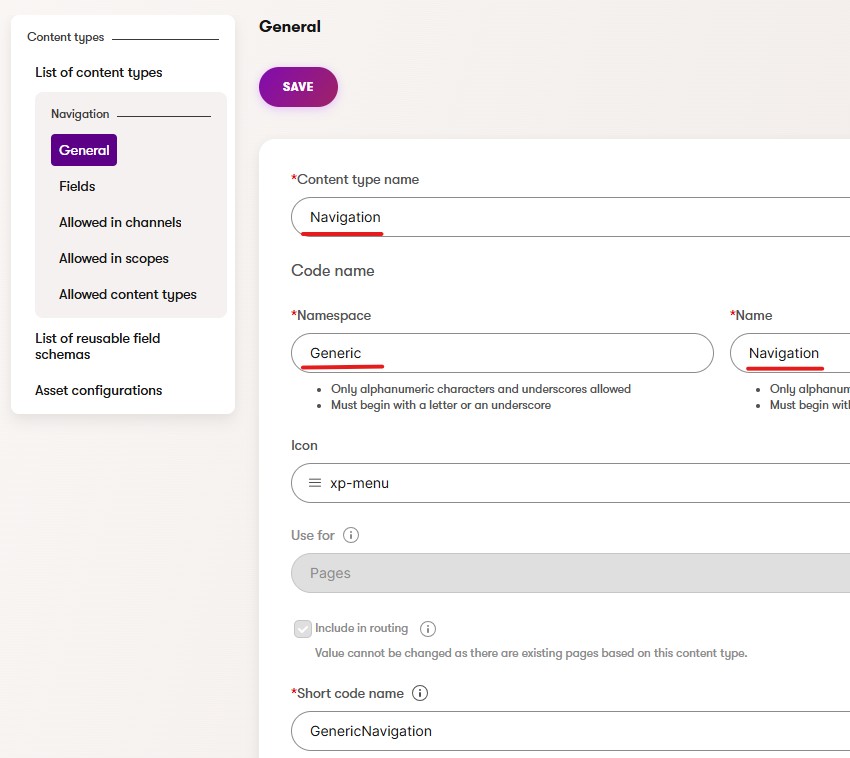
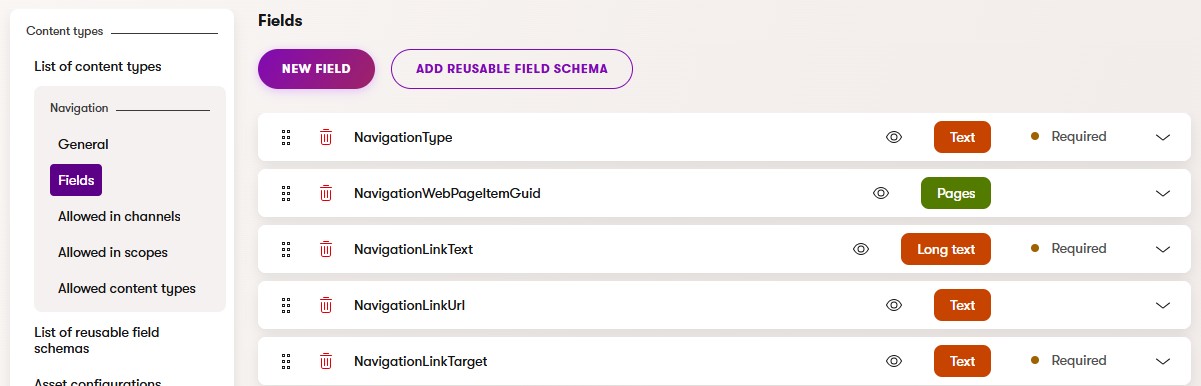
Create the necessary fields for the Navigation content type.
- NavigationType – Data Type: Text, Data source: ‘automatic;Automatic’ and ‘manual;Manual’, Initial value: automatic
- NavigationWebPageItemGuid – Data Type: Pages, FormComponent: Page selector, Maximum number of pages: 1
- NavigationLinkText – Data Type: Long text, Form component: Text area
- NavigationLinkUrl – Data Type: Text, FormComponent: Text input, Visibility: Condition type: Depends on another field, Target field: NavigationType, Condition: Equal to, Value: manual
- NavigationLinkTarget – Data Type: Text, FormComponent: Text input, Default value: _self, Form component: Dropdown selector, Data source: ‘_self;Open in this window’ and ‘_blank;Open in a new window’, Initial value: _self
Your Navigation content type fields should look like this:
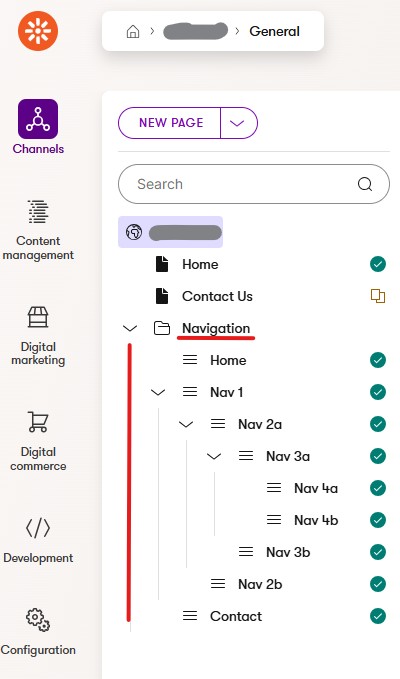
Now, go to your main site channel and create a new folder called “Navigation“. Under the folder create the navigation pages using the Navigation page type.
Here’s the structure you should end up with:
Before we’re getting to the coding part, make sure you import the Generic.Navigation page type in your project.
Here’s how to generate code files for your project.
On your Visual Studio “Xperience by Kentico” project, under Components folder, create a new folder called “Navigation“.
Create the following four pages: NavigationViewComponent.cs, NavigationViewModel.cs, Default.cshtml and NavigationItem.cshtml
NavigationViewComponent.cs
using CMS.ContentEngine;
using CMS.Websites;
using Kentico.Content.Web.Mvc;
using Microsoft.AspNetCore.Mvc;
using System.Collections.Generic;
using System.Linq;
using System.Threading.Tasks;

namespace Generic.Components.Navigation
{
    public class NavigationViewComponent : ViewComponent
    {
        private readonly IWebPageUrlRetriever urlRetriever;
        private readonly IContentQueryExecutor contentQueryExecutor;
        private readonly IContentRetriever contentRetriever;

        public NavigationViewComponent(
            IWebPageUrlRetriever urlRetriever,
            IContentQueryExecutor contentQueryExecutor,
            IContentRetriever contentRetriever)
        {
            this.urlRetriever = urlRetriever;
            this.contentQueryExecutor = contentQueryExecutor;
            this.contentRetriever = contentRetriever;
        }

        public async Task<IViewComponentResult> InvokeAsync(int parentID)
        {
            var navigationFolderID = parentID; // Passed parentID (parent-id) from VC

            var query = new ContentItemQueryBuilder()
                .ForContentType(Generic.Navigation.CONTENT_TYPE_NAME, subqueryParameters =>
                {
                    subqueryParameters.ForWebsite(
                        websiteChannelName: "YourChannelName", // change this for your channel name
                        includeUrlPath: true);
                    subqueryParameters.OrderBy("WebPageItemOrder");
                    subqueryParameters.WithLinkedItems(1);
                });

            IEnumerable<dynamic> results = await contentQueryExecutor.GetMappedWebPageResult<dynamic>(query);

            var navigationItems = new List<NavigationItemViewModel>();
            var childItems = new Dictionary<int, NavigationItemViewModel>();

            foreach (var navItem in results)
            {
                if (navItem == null)
                {
                    continue;
                }

                string pageLink;
                if (navItem.NavigationType == "manual")
                {
                    pageLink = navItem.NavigationLinkUrl;
                }
                else // "automatic"
                {
                    var linkedPage = Enumerable.FirstOrDefault(navItem.NavigationWebPageItemGuid);
                    if (linkedPage != null)
                    {
                        WebPageUrl url = await urlRetriever.Retrieve(linkedPage.WebPageGuid, "en");
                        pageLink = url.RelativePath;
                    }
                    else
                    {
                        pageLink = "#";
                    }
                }

                var navigationItem = new NavigationItemViewModel
                {
                    NavigationLinkText = navItem.NavigationLinkText,
                    NavigationLinkUrl = pageLink,
                    NavigationLinkTarget = navItem.NavigationLinkTarget,
                    WebPageItemID = navItem.SystemFields.WebPageItemID,
                    WebPageItemParentID = navItem.SystemFields.WebPageItemParentID,
                };

                if (navigationItem.WebPageItemParentID == 0 || IsNavigationFolder(navigationItem.WebPageItemParentID, navigationFolderID))
                {
                    navigationItems.Add(navigationItem);
                }
                else
                {
                    childItems.Add(navigationItem.WebPageItemID, navigationItem);
                }
            }

            // Build the hierarchy
            foreach (var navigationItem in navigationItems)
            {
                BuildHierarchy(navigationItem, childItems);
            }

            return View("~/Components/Navigation/Default.cshtml", navigationItems);
        }

        private bool IsNavigationFolder(int parentID, int navigationFolderID)
        {
            // Check if the parentID corresponds to the "Navigation" folder
            return parentID == navigationFolderID;
        }

        private void BuildHierarchy(NavigationItemViewModel parentItem, Dictionary<int, NavigationItemViewModel> allItems)
        {
            var childItems = allItems.Where(item => item.Value.WebPageItemParentID == parentItem.WebPageItemID).Select(item => item.Value).ToList();

            foreach (var childItem in childItems)
            {
                parentItem.Children.Add(childItem);
                allItems.Remove(childItem.WebPageItemID);
                BuildHierarchy(childItem, allItems);
            }
        }
    }
}
NavigationViewModel.cs
using System;
using System.Collections.Generic;

namespace Generic.Components.Navigation;
public class NavigationItemViewModel
{
    public string NavigationLinkText { get; set; }
    public string NavigationLinkUrl { get; set; }
    public string NavigationLinkTarget { get; set; }
    public int WebPageItemID { get; set; }
    public int WebPageItemParentID { get; set; }
    public List<NavigationItemViewModel> Children { get; set; } = new List<NavigationItemViewModel>();
}
Default.cshtml
@using Generic.Components.Navigation
@model IEnumerable<NavigationItemViewModel>

@if (Model.Any())
{
    <ul class="main-navigation">
        @foreach (var item in Model)
        {
            <li>
                @await Html.PartialAsync("~/Components/Navigation/NavigationItem.cshtml", item)
            </li>
        }
    </ul>
}
NavigationItem.cshtml
@using Generic.Components.Navigation
@model NavigationItemViewModel

<a style="color:#fff;" href="@Model.NavigationLinkUrl" target="@Model.NavigationLinkTarget">
    @Model.NavigationLinkText
</a>

@if (Model.Children.Any())
{
    <ul class="sub-navigation">
        @foreach (var child in Model.Children)
        {
            <li>
                @await Html.PartialAsync("~/Components/Navigation/NavigationItem.cshtml", child)
            </li>
        }
    </ul>
}
Save and Rebuild your XbK project.
Now, you need to add the view component on your _Layout.cshtml so the navigation menu can show.
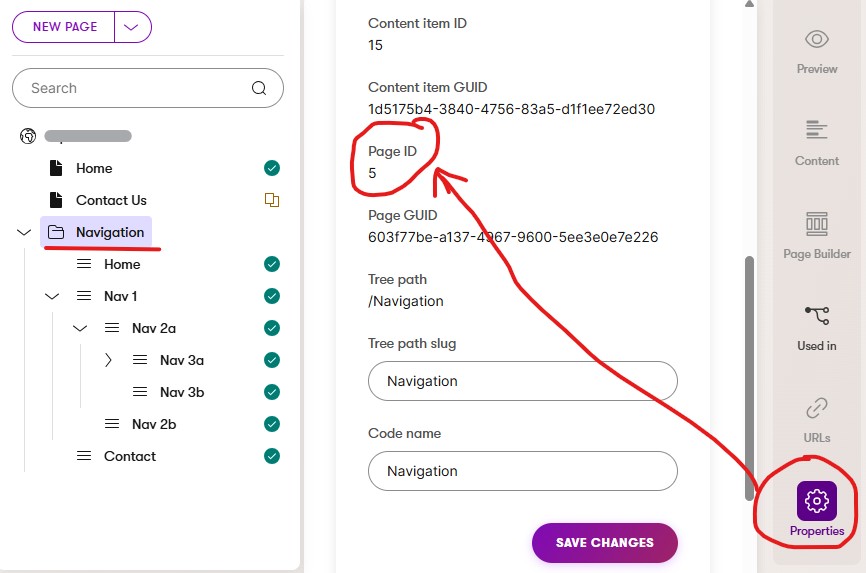
<vc:navigation parent-id="5"></vc:navigation>
Find your Navigation folder Page ID under the folder Properties and replace it here: parent-id=”5″